
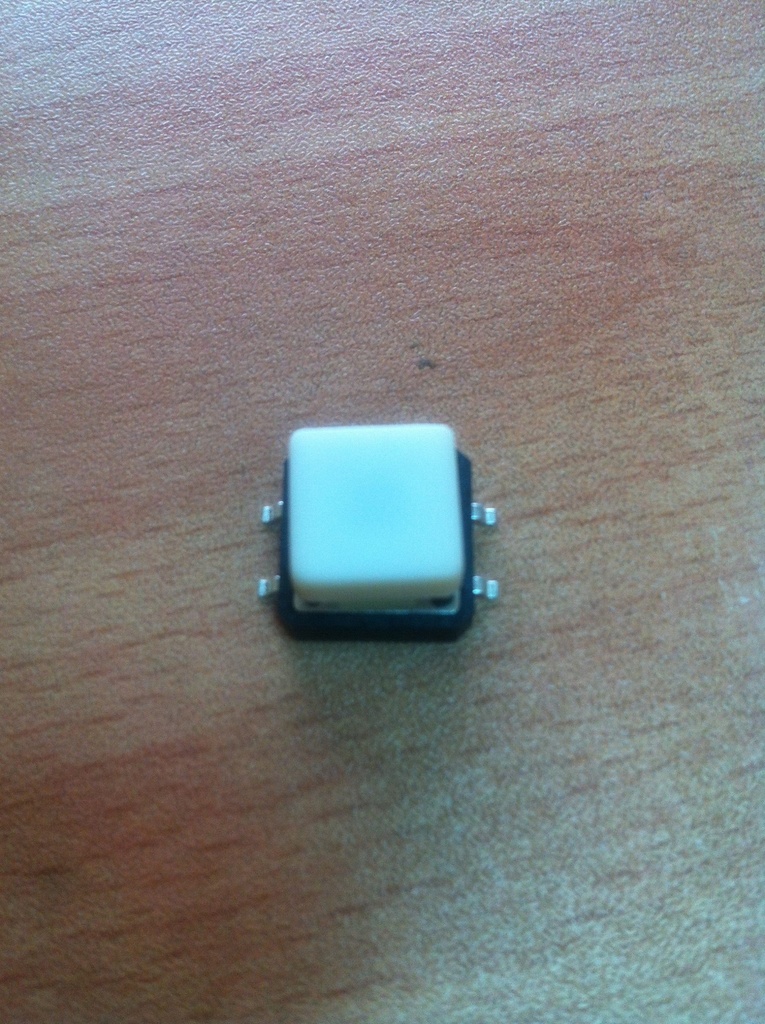
SMD tact switch with cap
The SMD (Surface-Mount Device) tact switch with cap is a compact, reliable switch used in various electronic devices and applications. The switch is mounted directly onto a printed circuit board (PCB) and is designed to be activated by pressing the cap. The cap provides a user-friendly interface and helps in guiding the pressing action.
Key Features:
- Type: SMD Tactile Switch
- With Cap: Includes a cap for easy pressing and improved tactile feedback
- Mounting Type: Surface-mount for easy PCB integration
- Actuation Force: Typically designed for low actuation force
- Switch Function: Momentary contact (normally open; closes when pressed)
- Durability: Designed for many cycles of operation
- Package Type: SMD (Surface-Mount Device)
- Cap Type: Plastic or rubber cap for tactile feedback
- Actuation Force: Typically ranges from 100g to 500g (varies by model)
- Contact Rating: Generally rated for 50mA to 100mA at 12V (varies by model)
- Contact Resistance: Typically 100Ω or less
- Insulation Resistance: Typically 100MΩ or more
- Life Cycle: Rated for up to 1,000,000 cycles
- Operating Temperature Range: -20°C to +85°C
- Consumer Electronics: Used in devices like remote controls, calculators, and handheld devices
- Industrial Equipment: Integrated into control panels and user interfaces
- Automotive: Utilized in dashboards and control systems
- Medical Devices: Employed in compact medical equipment and interfaces
- PCB Mounting: Solder the SMD tact switch to the designated pads on the PCB.
- Cap Placement: Ensure the cap is securely placed on the switch for proper operation and tactile feedback.
- Testing: Test the switch to ensure it functions correctly and provides the desired tactile response.
- Integration: Integrate the switch into the final assembly and connect it to the necessary circuits or components.
- Handling: Handle with care to avoid damaging the switch or cap.
- Soldering: Follow proper soldering techniques to avoid overheating or damaging the switch.
- Compatibility: Ensure the switch is compatible with the design requirements and PCB layout.